

TorchFX: GPU-Accelerated Audio DSP#
A modern Python library for high-performance digital signal processing in audio, leveraging PyTorch and GPU acceleration.
TorchFX is designed for researchers, engineers, and developers who need fast, flexible, and differentiable audio processing. Build complex DSP pipelines with a clean, PyTorch-native API that scales from prototyping to production.
New to TorchFX? Get started in minutes with our installation guide and first examples.
Explore the complete API documentation for filters, effects, and core classes.
Learn through practical examples: ML preprocessing, real-time processing, custom effects.
Join the community on GitHub. Contribute, report issues, or discuss ideas.
Why TorchFX?#
Built on PyTorch for high-performance audio processing on CUDA-enabled devices. Process multichannel signals orders of magnitude faster than traditional CPU-based libraries.
Chain filters and effects with the intuitive pipe operator (|) or combine them in parallel (+). Build complex processing chains with readable, maintainable code.
All filters are torch.nn.Module subclasses. Seamlessly integrate DSP into neural networks, enable gradient-based optimization, and leverage PyTorch’s ecosystem.
Clean, object-oriented API designed for ease of use. Focus on your audio processing logic, not on boilerplate code.
Create custom filters and effects by extending base classes. Implement your own processing algorithms while keeping full compatibility with the framework.
Benchmarks show substantial performance gains over SciPy, especially with long and multichannel signals. Efficient threading even on CPU.
Key Features#
- Rich Filter Library
Comprehensive collection of IIR and FIR filters: Butterworth, Chebyshev, Elliptic, Linkwitz-Riley, parametric EQ, shelving filters, and more.
- Professional Effects
Built-in audio effects including reverb, delay, normalization with multiple strategies, and gain control.
- Flexible Composition
Sequential: Chain filters with
wave | filter1 | filter2Parallel: Combine filters with
filter1 + filter2for parallel processingModular: Build reusable processing blocks as
torch.nn.Moduleinstances
- Differentiable Processing
All operations are differentiable, enabling gradient-based optimization of filter parameters and integration with neural audio models.
- Multi-channel Support
Efficiently process stereo, surround, and multi-mic audio with full GPU acceleration across channels.
Quick Example#
import torch
from torchfx import Wave
from torchfx.filter import LoButterworth, ParametricEQ

# Load audio
wave = Wave.from_file("audio.wav")

# Create filters
lowpass = LoButterworth(cutoff=5000, order=4, fs=wave.fs)
eq = ParametricEQ(frequency=1000, q=2.0, gain=3.0, fs=wave.fs)

# Sequential processing
processed = wave | lowpass | eq

# Parallel processing (filter combination)
stereo_enhancer = lowpass + eq
enhanced = wave | stereo_enhancer

# Save result
processed.save("output.wav")
Performance#
TorchFX delivers significant performance improvements over traditional libraries like SciPy, especially for:
Long audio signals (minutes to hours)
Multichannel processing (stereo, surround, multi-mic)
Real-time applications (low-latency streaming)
Batch processing (ML dataset preprocessing)
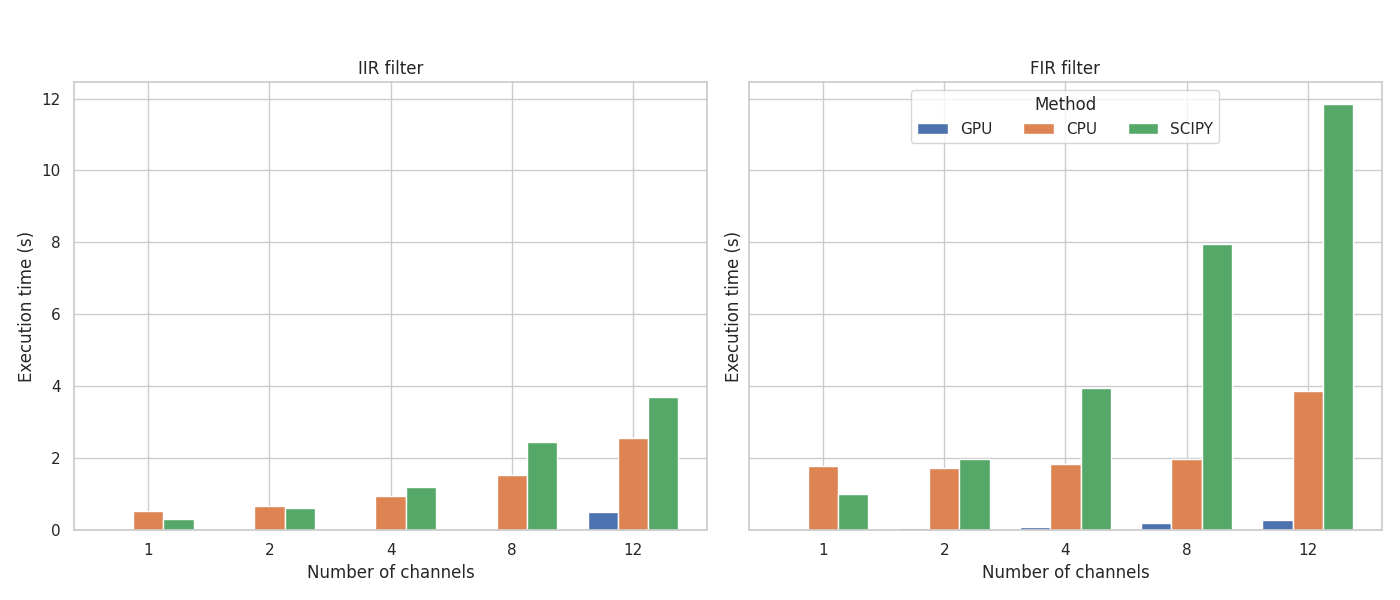
Benchmarks from our research paper demonstrate TorchFX’s efficient use of parallel GPU computation. Even on CPU, optimized PyTorch internals provide competitive performance.
Get Started#
Install TorchFX with pip:
pip install torchfx
Or from source:
git clone https://github.com/matteospanio/torchfx.git
cd torchfx
pip install -e .
See the installation guide for more details.
Citation#
If you use TorchFX in your research, please cite our paper:
@misc{spanio2025torchfxmodernapproachaudio,
  title={TorchFX: A modern approach to Audio DSP with PyTorch and GPU acceleration},
  author={Matteo Spanio and Antonio Rodà},
  year={2025},
  eprint={2504.08624},
  archivePrefix={arXiv},
  primaryClass={eess.AS},
  url={https://arxiv.org/abs/2504.08624},
}