Cluster dashboard
Press d from the main screen for a cluster-wide overview, refreshed every 60 s from
two sinfo calls.
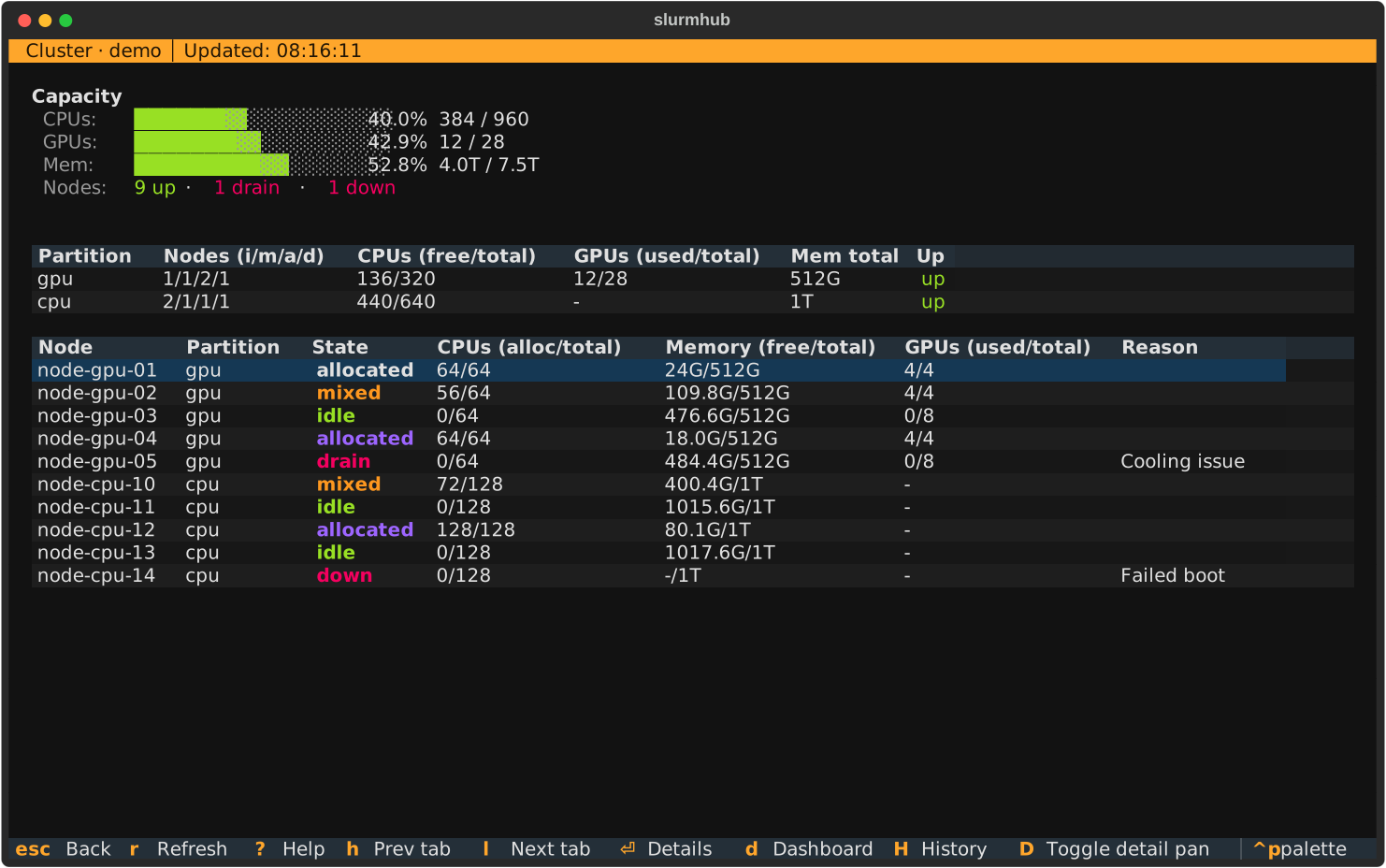
How to interpret each row
Capacity — sum across all nodes. CPU and memory percentages are computed from the per-node
%C(Allocated/Idle/Other/Total) andRealMemory - FreeMemfields.Partition table columns:
Nodes (i/m/a/d) — counts by state (idle / mixed / allocated / down|drain|fail).
CPUs (free/total) —
total - allocper partition.GPUs (used/total) — counted from the partition’s
Gresfield plus per-node usage.Mem — the largest
RealMemoryvalue seen for the partition, so heterogeneous partitions still show a meaningful number rather than double-counting.Up — derived from
sinfo’s%aAvailability flag.
Node table — the per-node rollup, color-coded by state.
Note
GPU usage is approximate: allocated / mixed nodes count as “all GPUs used” because
sinfo does not expose per-job GPU counts. For exact per-job GPU utilisation, open
the Job detail screen — it queries nvidia-smi inside the job’s
allocation.
Keybindings
Key |
Action |
|---|---|
|
Force-refresh |
|
Scroll the body. |
|
Help cheatsheet. |
|
Back to the job list. |